
Now free and open source · Apache-2.0
1. Connect.
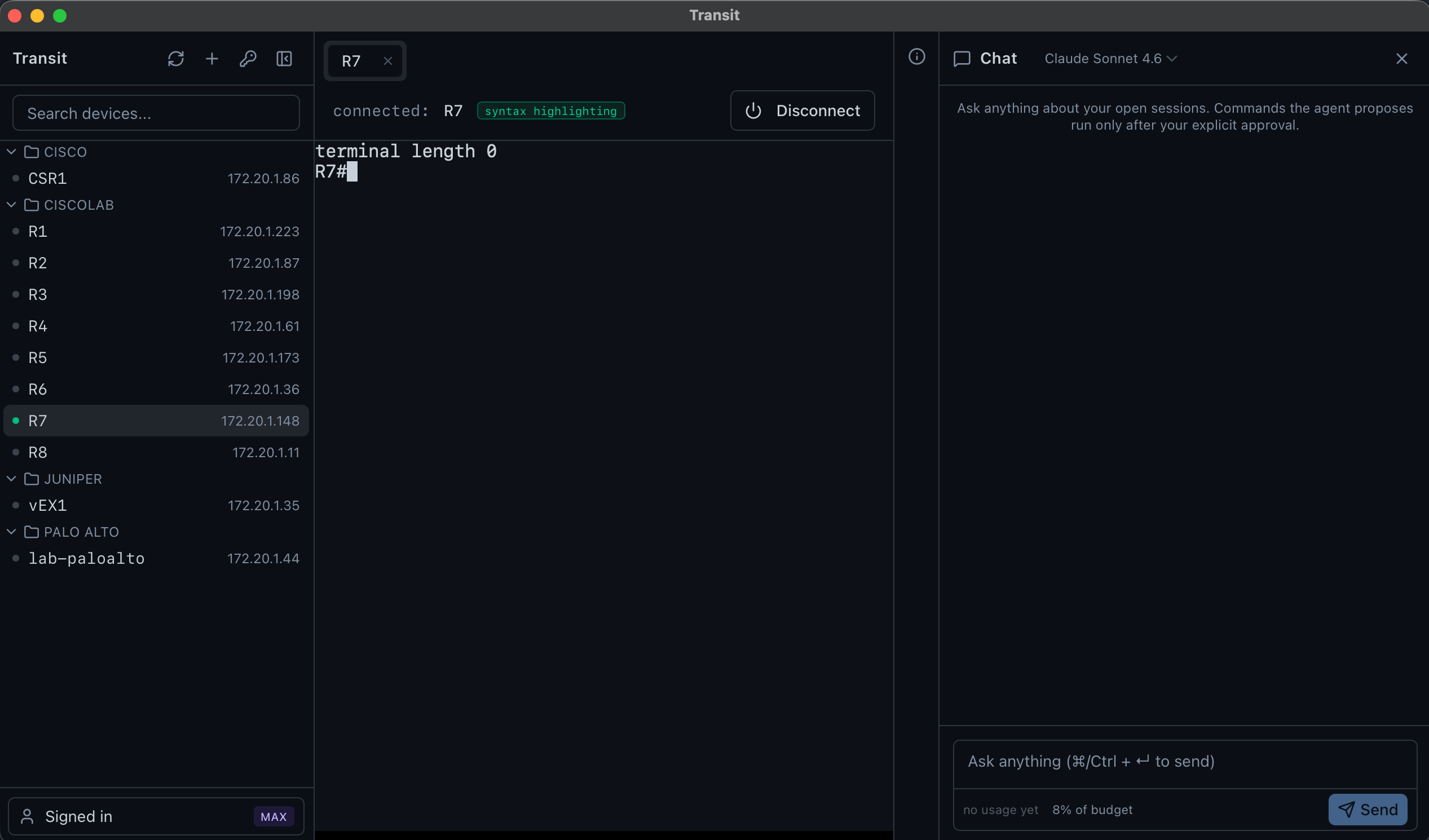
2. Ask questions.
That's IT.
Transit AI is the all-in-one workspace for network engineers — SSH, serial console, SFTP file transfer, packet capture, and a full API client in one app, plus a local terminal for your own machine. The investigation-only AI reads all of it and can change nothing; every action it proposes passes a permit and your explicit click. Always both, never either.
The IT is the point.
Free and open source · macOS · Windows · Linux · No account required
- SOC 2 Type I attested
- Patent-pending safety architecture
- Never trains on your data
- Built by a network engineer
All of it is free. And open source.
Download Transit and use it as your everyday SSH, serial, and API client at no cost — no account, no trial clock. Multi-session tabs with split-screen tiling, a GPU-rendered local terminal (zsh, PowerShell, WSL) beside your remote sessions, SFTP file transfer, packet capture with computed findings (no driver — it runs your OS's own tcpdump/pktmon), per-host colour cues, full-buffer search, session logging, capture-and-diff for config drift, and one-click import of your existing SecureCRT, OpenSSH, or CSV inventory (and your Postman collections) — plus a Send Break button and auto-reconnect for serial consoles. The investigation-only AI is included: bring your own Anthropic or OpenAI key, or run it on local models.
Security model
The three inviolable rules
Not preferences. Not promises. Built into the product — and verified on every release we ship.
Rule 1
Your SSH credentials stay in your OS keychain — Transit AI's UI never reads them back.
$ transit build --release
checking: AI component → credential store
no code path exists ✓
a build that adds one fails — checked on every release
Rule 2
The AI has six abilities — list, read, propose a command, propose a read-only API call, query a packet capture, ask. It can't gain a seventh at runtime.
agent tools (all of them)
✓ list open sessions
✓ read scrollback — secrets stripped first
✓ propose a command — gated, then approved by you
✓ propose a read-only API call (GET) — gated, then approved by you
✓ query a packet capture — analysis only, payload has no query
✓ ask you a question
✗ execute, configure, write — no such tools exist
Rule 3
Every AI-suggested command passes the vendor permit list AND your explicit click.
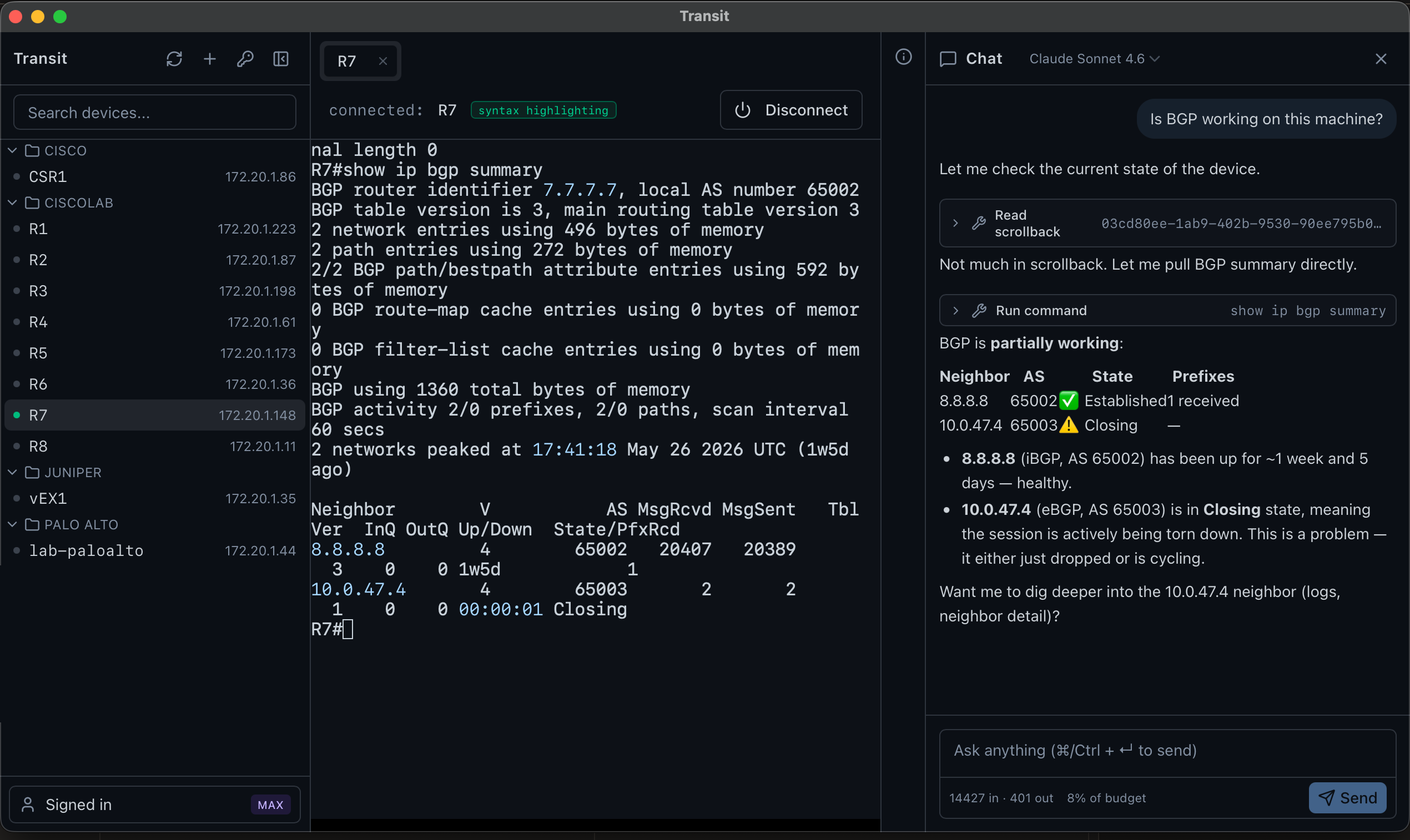
$ show ip bgp summary
permit list ✓ · your click✓ → runs
$ configure terminal
permit list ✗ → blocked
Always both, never either.
Not a rule — a choice
Run the AI on models you host — the conversation never leaves your perimeter.
Point Transit at Ollama on your own machine, or at a vLLM, LM Studio, or llama.cpp endpoint you control. Nothing relaxes in local mode — the per-vendor permit list, the approval click, and scrollback redaction run exactly as they do on cloud models. And we take "local" literally: Ollama's :cloud models proxy inference to ollama.com, so Transit hides them from the picker entirely.
Local models aren't enterprise-gated — they start on the first paid tier, Hobbyist, $9/mo.Set up local models →
model: qwen3.6:27b · local — where your bytes go
prompts + device output → your hardwarestays here ✓
transitai.app → sign-in + billing — nothing else
✗ anthropic.com / openai.com — never contacted
✗ ollama.com ":cloud" models — hidden from the picker
local means local
Features
Built for network engineers
SSH, serial, SFTP, packet capture, a local terminal, and a full API client — one app, with an investigation-only AI that reads it all but can't change your gear.
Investigation-only AI agent
Ask, don't bash. The AI investigates with six tools — list, read, propose a command, propose a GET, query a packet capture, ask — and every command or API call it proposes runs through a permit AND your explicit click. Always both, never either.
API sessions — a full API client, built in
Beyond SSH: reach UniFi and any REST controller. You run any request; the investigation-only AI can only propose GETs — gated, redacted, behind your click. Import your existing Postman collections. Free, like the terminal.
Local terminal — a real shell, GPU-rendered
Open a local OS shell — zsh, bash, fish, PowerShell, cmd, WSL, a Python or Node REPL — as a tab beside your SSH sessions. GPU-accelerated xterm rendering, real resize, session logging. The launcher discovers the shells on your machine and shows their versions. Free — and the AI is structurally blind to it (it's yours, not the agent's).
Split-screen tiling
Split any tab into a resizable grid — panes side by side or stacked, nested to any depth, Windows-Terminal-style. Drag a tab into a pane to tile it. SSH, serial console, and local shells all share one layout.
File transfer (SFTP)
A SecureFX-style dual-pane file browser over the devices you already have — same inventory, same credentials, same host-key trust as an SSH session. Drag files between local and remote (or in from Finder/Explorer), with a live transfer queue. Free, and — like the local terminal — off-limits to the AI.
Packet capture + analysis (PCaps)
Capture from a local NIC (no driver — Transit drives the OS's own tcpdump/pktmon) or open any pcap. A filterable explorer plus computed findings — retransmits, zero-window stalls, DNS failures, TLS alerts — each with one-click evidence. Free; the AI reads the analysis, never the payload.
Per-vendor command policy
Default-deny regex lists for Junos, Cisco IOS / IOS-XE / NX-OS / IOS-XR, Arista EOS, PAN-OS. Shell-escape verbs are explicitly blocked (no start shell, no tclsh, no app-hosting).
The AI never sees your credentials
Even a jailbroken model can't ask for your password — the AI and the credential store are isolated components with no programmatic path between them. An automated check fails the build if anyone tries to add one.
Multi-session tabs
The tab strip you already know. One pane per session, scrollback survives tab switches. Right-click for rename, export scrollback, tile into a split, close.
Secrets stay in your keyring
macOS Keychain, Windows Credential Manager, Linux Secret Service, or the SSH agent. Cloud AI keys (Anthropic, OpenAI) live in isolated proxy infrastructure, never on disk in the app — or bring your own key, passed through per-request and never stored. Local models use no provider key at all.
Local models (BYOM)
Run the agent on models you host — Ollama, or an OpenAI-compatible endpoint like vLLM, LM Studio, or llama.cpp — with every guardrail intact. The full story is in the security model above.
Output redaction
PEM blocks, encrypted passwords, AWS keys, JWTs — stripped before scrollback ever reaches the LLM. Per-conversation ordinals (REDACTED:pem#1) let the agent reason about credential equivalence without seeing bytes.
Quick copy/paste, syntax highlighting
Per-device toggles. Auto-copy on selection, right- or middle-click paste, multi-line paste confirmation. Familiar, but way better.
Session export with re-redaction
Export any session's scrollback to a file. Re-runs the redaction filter on save and offers age encryption so a shared transcript can't accidentally leak.
FAQ
Straight answers
The questions worth asking before you install anything that touches prod.
Is Transit free?+
Yes — the full client is free with no account: SSH, serial console, SFTP file transfer, packet capture and analysis, a local terminal, and a REST API client. The investigation-only AI is the paid upgrade, from $9/month, and the Operator tier has a 14-day free trial.
Do you train on my data?+
Never. We don't train on or sell your data. The cloud proxy meters metadata only — token counts, latency, cost — and rejects any log line carrying your prompts, commands, or device output, verified at build and at runtime. Prefer zero third parties? Run the AI fully local on Ollama.
What can the AI actually do — and what if it's wrong?+
It has exactly six tools: list sessions, read redacted scrollback, propose a command, propose a read-only API call, query an open packet capture (analysis only — never wire payload), and ask you a question. It is investigation-only — every command it proposes must pass a per-vendor permit list AND your explicit click, and a config or write command is blocked by the permit list before it ever reaches you. It cannot execute, configure, or write on its own.
Which network vendors are supported?+
Cisco IOS, IOS-XE, NX-OS and IOS-XR, Juniper Junos, Arista EOS, and Palo Alto PAN-OS, plus a generic Linux profile — and you can add your own vendors with Bring Your Own Policy.
Is my data safe when I use the cloud AI?+
Your SSH credentials stay in your OS keychain — Transit's UI never reads them back, and the AI is a separate component with no code path to the credential store, checked on every build. Provider keys live in isolated proxy infrastructure, never on disk. Known secret-shaped tokens in device output are stripped before the model sees them.
Is it open source?+
No — Transit is closed-source commercial software. In place of source, the security model and threat model are documented in full, it holds a SOC 2 Type I attestation (Type II observation period underway), and its safety architecture is patent-pending.
What platforms does it run on?+
macOS (Apple Silicon), Windows, and Linux — a free download, no account required.
More in the full FAQ and the security model.
Get started
Investigate faster. Change nothing.
Download it, or read the source.